
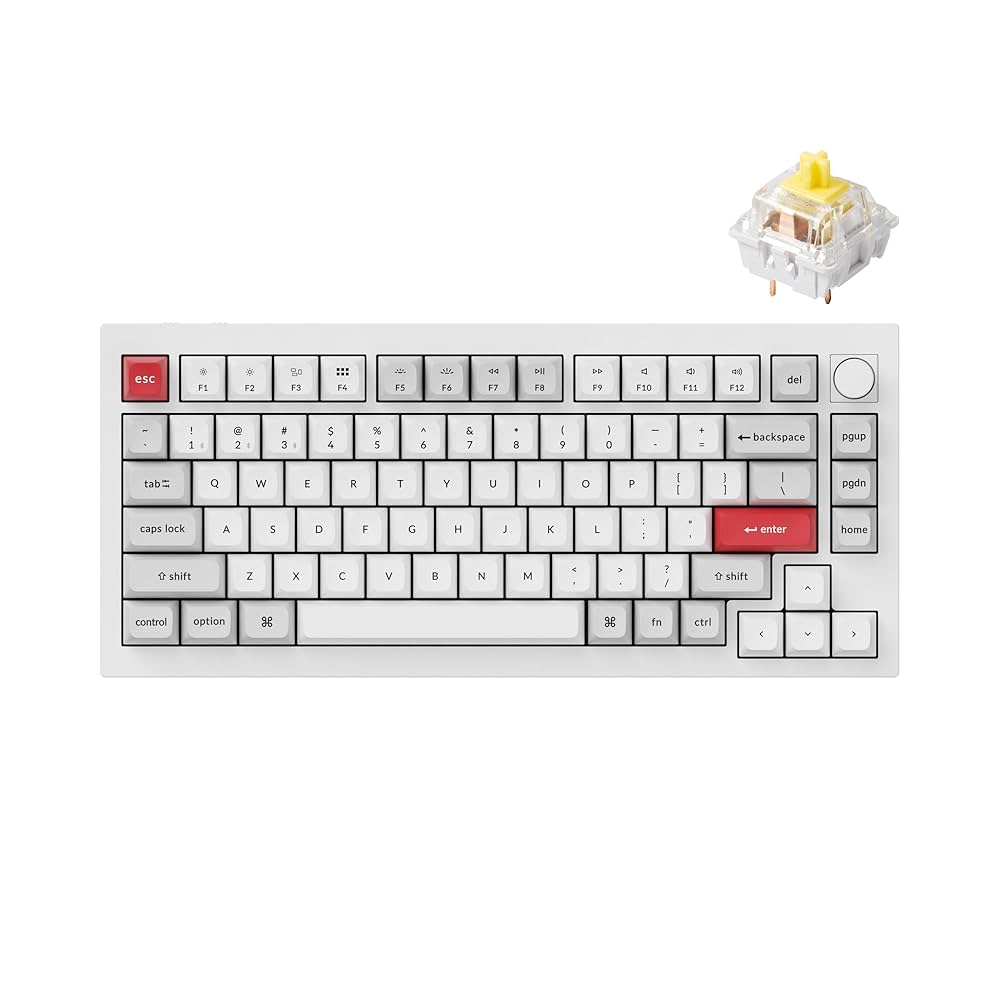
Why I Chose the Q1 Pro
This is the first time I’ve owned a keyboard this high-end, and I spent a lot of time deciding between the Keychron Q1 Pro and the Wooting. I wanted an aluminum casing and the ability to switch between computers without relying on a KVM switch. These features are rare in many keyboards, which is what led me to the Q1 Pro. The build quality and design immediately stood out as premium, and I was excited to try it out.
First Impressions and Build Quality
The keyboard looks sleek and solid on my desk. The aluminum case feels heavy and durable, giving the impression it will last for years. I love the knob for volume control and muting, which is smooth and tactile. The keyboard comes with tools to remove keycaps and switches, which is great for newcomers like me who want to explore modding. The overall aesthetic is minimal yet striking, and the keyboard has been a hit on social media, with many people commenting on how clean it looks.
Typing Experience and Key Feel
When I first started using it, the keys felt extremely tall compared to my previous keyboards, and combined with the tall case, it made typing initially uncomfortable. The spacebar out of the box had a hollow, uneven sound that rattled on one side, which can be distracting. Once I got used to the height and adjusted with a wrist rest, typing became much more comfortable. The banana switches I chose offer a clicky yet satisfying sound, and the typing feel is a real treat for anyone who spends hours at a keyboard.
Modding and Customization
One of the standout features is how mod-friendly this board is. The QMK firmware supports key remapping, although my unit came with some errors that required troubleshooting. VIA software makes it easy to assign missing functions, like using the Delete key for Print Screen. Keycap customization is possible, and while the original set is great, there are plenty of hot-swappable options online if you want a different color scheme. The keyboard also comes with sound-dampening foam and gaskets that add a soft, premium typing feel.
Connectivity and Practical Use
The Q1 Pro primarily works wired, and while it doesn’t have 2.4GHz wireless at this price, Bluetooth pairing between Mac and Windows worked without any issues. The included cable is short, so I recommend making sure your setup allows for a comfortable connection without stretching the port. Switching computers is smooth, and the keyboard’s versatility makes it suitable for mixed-use setups.
Lighting and Aesthetic Features
The RGB lighting is subtle and attractive, although it’s not the brightest compared to some other keyboards. South-facing LEDs make it more compatible with custom keycaps, and the effects are visually pleasing without being overpowering. For me, the clicky sound and tactile feel of the keys matter more than flashy lighting, and this board delivers in that area.
User Opinions and Overall Impressions
Different users will experience this keyboard differently. Some find the height challenging and prefer using a palm rest. Others love the premium feel and modding potential. The spacebar may require adjustment, but many users, including myself, end up loving the typing experience once the keyboard is set up to preference. It’s highly recommended for anyone looking for a solid enthusiast-level mechanical keyboard that can serve as a daily driver while offering plenty of room for customization.
Takeaway
The Keychron Q1 Pro feels like a high-quality keyboard worth investing in. While there are minor quirks out of the box, the build quality, modding potential, and satisfying typing experience make it stand out. It’s a keyboard you can grow with and tweak to your liking, making it a worthy addition to any desk setup.
Views: 4
Suggested Topics;
👉 Lazy Ways Moms Can Make Money
👉 Best Ways to Make Money Online as a Teenager
👉 Is NavyReview.com Free $500 Old Navy Gift Card SCAM or Legit?
👉 Is STDEI GLP-1 Legit or Total Scam?
👉 Aldana vs. GameStop Lawsuit Settlement Legit or Scam?
👉 Is the CostReviews.com Free $750 Costco Gift Card Scam or legit?
👉 Is Qinux Briza AC Legit or a Waste of Money? Full Review
👉 Viflame.com Review – FREE 0.31 BTC Legit or Scam?
👉 BodyAccel Whitening Toothpaste Review
👉 The Automatic Cash Machine Review
👉 My Honest Review of the Sakerplus Twister
👉 Lotto SMS Review
👉 Inside the FxAlexG Only Signal by Alex Gonzalez
👉 How to Get Delta Executor Roblox
👉 How to Import and Export EHI Config Files in HTTP Injector
👉 How to Create Unlimited HTTP Custom Config Files for Free Internet
👉 How to Use HA Tunnel Plus with SNI Hosts for Free Internet
👉 Tim Allen Push Button Reviews Legit or Scam
👉 Qinux WaterBlitz Review
👉 Is Grab Dumb Money Legit or Scam?
👉 How to Receive Money from PayPal in Uganda Without Creating a PayPal Account
👉 Websites that pay $100 a day
Views: 4